Tag Selector
The tag selector allows users to select and optionally create tags. The selection is submitted as an array.
Example 1
This tag selector with minimal configuration.
 <x-textstem::inputs.tagselection
                    name="tags"
                    label="Tag Selector"
                    :target="$post"
                    ></x-textstem::inputs.tagselection>
Example 2
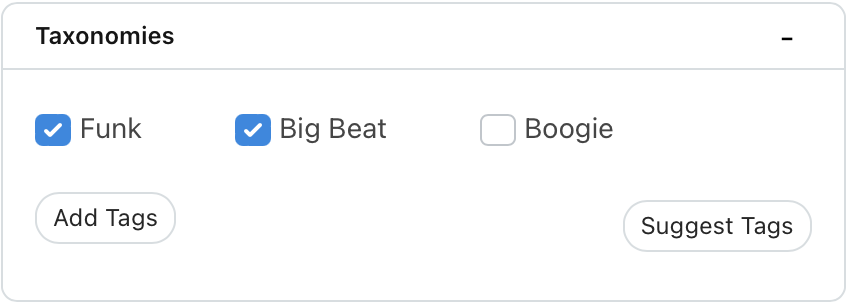
This tag selector is configured to allow the user to select tags of type 'Genre'. The list of avaioable tags and the checked tags have been explicitly provided (in the previous example, they would have been determined using the target $post (for checked tags) and postType (for available tags) - and if no tagType has been specified, then all tags are listed;
 <x-textstem::inputs.tagselection
            name="genreTags"
            :checked="$checked"
            label="Tag Selector"
            tagType="Genre"
            :target="$post"
            :tags="$tags"
            ></x-textstem::inputs.tagselection>
This will produce a widget like this:
Options
| Option | Description |
|---|---|
name |
Input name. Note, this should be specified without the array braces. The default is 'tags' |
tagType |
The type of tag to list (optional - if not provided, all tags are listed) |
tags |
A collection of tags the user can select from. If not provided, the widget will collect all the tags of the specified type - or all tags if no type is provided. |
target |
The target is either (1) an object - which is assumed to be the model instance being tagged, or (2) a string - which is assumed to be the classname of the model. If the classname is used, you also need to specify the target_id - which is used to find the model. |
target_id |
This is required if the target is specified using a className rather than a model instance. |
checked |
This is an array of checked tag IDs. If not provided, it will be retrieved directly from the target. |
canCreate |
If true, the user can create new tags. Default is true. |
method |
If the site is AI enabled, the widget can suggest tags. To do this, you need to specify a method or property of the target object which is used to get the 'content' of the target which will be analysed by the AI in order to suggest suitable tags. The default is 'content' |
Code Snippets
Get a collection of all tags of a specific type like this
$tags = Tag::getWithType('Genre');
For a model $post, you can get the checked array like this:
$checked = $post->tags->pluck('id')->toArray() : [];